
Quick Answer

Legal case management software helps law firms organize case information, track client activity, and manage daily legal work. These systems store case and contact data, record billable time, and provide calendaring tools that keep teams aligned on tasks and deadlines. Case management platforms also support internal compliance by centralizing documents, communication records, and case actions. The right platform depends on your firm's size, practice area, budget, and growth trajectory - not on which tool has the most features.
When I first started researching legal case management software for this guide, I expected to find a straightforward market with a handful of dominant players.
What I found instead was a sprawling ecosystem of over 400 tools – each making similar promises, each targeting slightly different firms, and each carrying trade-offs that most comparison articles never honestly address.
The stakes of getting this decision wrong are significant. Case management is your law firm’s operating system. Choose wrong and you migrate in 18 months. [Source: Legalintaker]
That migration costs time, money, staff goodwill, and client confidence.
What Is A Legal Case Management Software?
Most firms underestimate the operational scope of a modern legal case management software platform.
They approach the purchase as a glorified calendar and document folder. That framing leads to underutilization – and eventually, migration.
A well-implemented platform does six things simultaneously:
- Centralizes every piece of case information so that any attorney or legal assistant on the team can access the full picture of a matter in seconds.
- Automates time capture so that billable hours are recorded passively rather than reconstructed at the end of the day.
- Manages deadlines and court dates with calendar logic that accounts for jurisdiction-specific rules.
- Generates documents from templates, reducing the time attorneys spend on routine drafting.
- Handles billing and trust accounting so that IOLTA compliance is built into the workflow rather than bolted on.
- Maintains a client portal that keeps clients informed without requiring staff to field status calls.
Capabilities such as workflow automation, built-in time tracking, and AI-supported document handling are becoming more common. This is prompting buyers to replace older systems for improved efficiency and better oversight of their caseloads. [Source: Capterra]
The gap between firms that use these capabilities fully and firms that use only 30% of their platform is substantial – and it shows in profitability.
The Market In Numbers: Why This Decision Matters More Than Ever
I found one set of numbers that reframed how I think about this purchase decision.
The legal case management software market reached $849 million in 2025 and is projected to hit $916 million in 2026 – a 7.9% growth rate.
Law firms represent 61% of this market, spending over $518 million annually on these platforms.
Cloud adoption has crossed the tipping point: 64% of legal case management is now cloud-based, up from under 40% five years ago. [Source: Legalintaker]
More significantly: 68% of U.S. law firms now use advanced case management platforms. If your firm is still running on spreadsheets, Word documents, and a filing cabinet, you are competing against firms with systematized operations. That gap compounds over time.
Legal document management software is the foundation of this systematization – and it is the single feature category where the quality difference between platforms matters most.
A platform that handles documents poorly will frustrate every attorney and legal assistant on your team every single day.
Core Features Every Platform Must Have
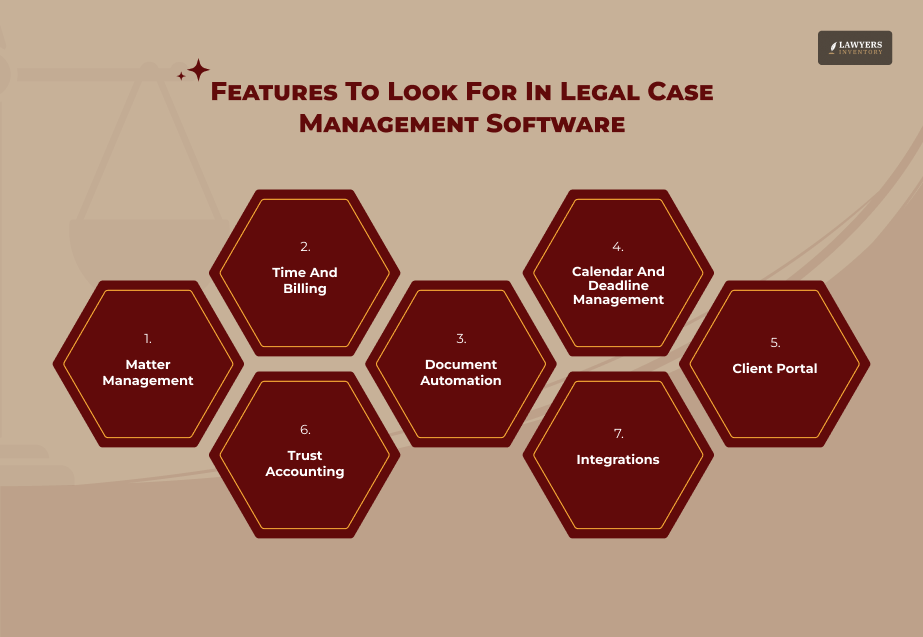
Before evaluating specific tools, I identified the non-negotiable feature set that every legal case management software platform must deliver to justify its cost.
Matter Management:
Every case must have a centralized home – contacts, documents, notes, tasks, deadlines, billing entries, and communications, all linked and searchable. If the platform requires you to maintain parallel records in other systems, it is not doing its job.
Time And Billing:
Passive time capture – where the system logs time automatically as you work – is now standard in leading platforms. Manual timers are acceptable. Reconstructed billing from memory is not.
Document Automation:
Templates that populate client and matter data automatically eliminate one of the most time-consuming administrative burdens in legal practice. The quality of document automation varies enormously between platforms.
Calendar And Deadline Management:
Jurisdiction-specific court calendaring rules must be built in – not added as a third-party workaround. A missed deadline is a malpractice event. This feature is not optional.
Client Portal:
A secure, branded portal where clients can view case updates, upload documents, and receive invoices reduces inbound calls and emails significantly.
Trust Accounting:
IOLTA compliance is non-negotiable. Any platform that requires a separate accounting system to handle trust funds creates an unnecessary compliance risk.
Integrations:
The platform must connect to the tools your firm already uses – Microsoft Office or Google Workspace, QuickBooks or Xero, email, e-signature tools, and payment processors.
What To Avoid When Evaluating Legal Case Management Software
Most people tell you what to look for. Almost none of them tell you what to avoid.
Avoid Platforms That Sell Features As Add-Ons:
Some vendors quote a low base price and then charge separately for client portals, document automation, e-signatures, and mobile access. The total cost of ownership is what matters – not the entry price.
Avoid Platforms With Poor Migration Support:
Your existing data – matters, contacts, documents, billing history – must transfer to the new platform cleanly. Ask every vendor specifically how they handle data migration and what happens if something goes wrong.
Avoid Platforms Without Genuine Training Resources:
Implementation failure is the most common reason firms regret their software choice. A platform that charges for training or provides only basic documentation will underperform regardless of its technical quality.
Avoid Making Your Decision Based On Feature Lists:
Features change quarterly. What matters is the platform’s architecture, its support quality, and whether it matches your firm’s actual workflow – not which box you can check on a comparison sheet.
Avoid One-Size-Fits-All Thinking:
A platform that is excellent for a personal injury firm may be poorly suited to a family law practice or an immigration firm. Practice area fit matters as much as feature depth.
The Best Legal Case Management Software In 2026
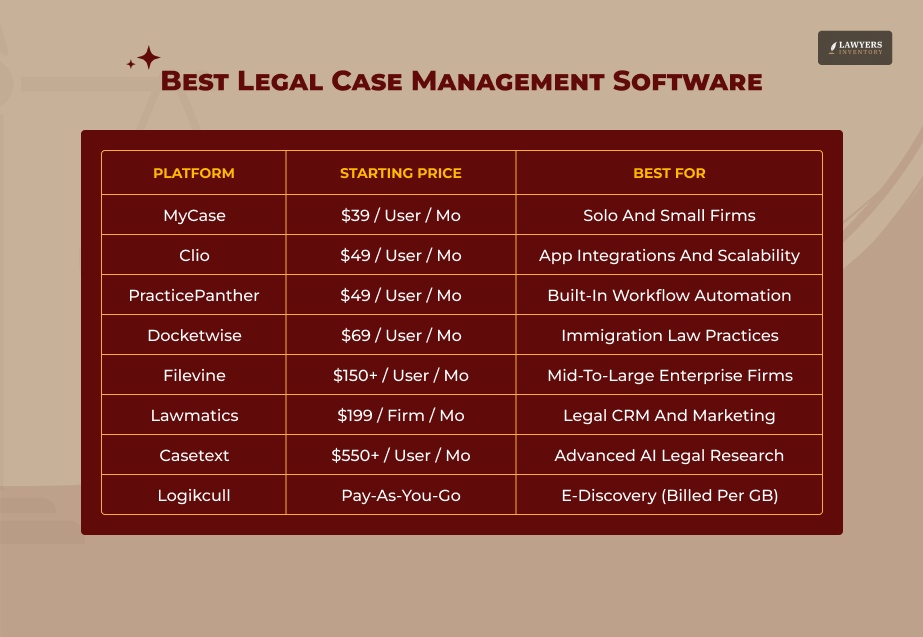
Based on my research – including verified user reviews, independent comparisons, and pricing data current as of July 2026 – here are the platforms that genuinely deserve consideration.
Clio – Best Overall For Most Firms
Clio is the most widely used platform, with 150,000+ users and the largest integration ecosystem – 250+ apps. It splits into Clio Manage for case management and Clio Grow for intake and CRM.
Clio commands roughly 25% of the cloud-based legal practice management market, according to the 2025 ABA Legal Technology Survey. It is the default recommendation from most consultants and the platform most integrations are built for.
Clio legal software pricing runs approximately $49–$149 per user per month across four tiers.
- EasyStart plan covers core case management for solos.
- Essentials plan adds integrations and task management.
- Advanced plan adds reporting and security features.
- Complete plan includes the full stack, including Clio Grow.
• Best for: Firms that want the deepest integrations and a platform they will not outgrow. Strong across most practice areas.

• Limitation: Clio Grow is a separate subscription. Firms that want intake and CRM must budget for both.
MyCase – Best For Simplicity And Value
MyCase bundles most features – intake, document automation, passive time tracking, payments, and AI tools – into one subscription instead of selling them as add-ons. Pricing starts from about $39 per user per month.
MyCase earns consistent praise for its integrated billing system and data import tools. It serves family law, estate planning, real estate, personal injury, and immigration practices well.
Its sister company Docketwise makes it the smart choice for immigration firms wanting dedicated form management.
• Best for: Solo practitioners and small firms wanting simplicity, integrated billing, and strong client engagement tools.

• Limitation: Less suitable for large firms with complex multi-department workflows.
Docketwise – Best For Immigration Law
Docketwise combines collaborative, multilingual form preparation with robust case management and the first CRM designed specifically for immigration lawyers.
It redesigns the client intake process with a modern experience that supports family, humanitarian, and business immigration law with a comprehensive form library.
Docketwise integrates directly with USCIS filing logic and supports questionnaire translation into Spanish, French, Portuguese, Russian, Arabic, Hindi, Chinese, and more.
Pricing runs $69 – $119 per user per month across three tiers. [Source: Legal Soft]
• Best for: Immigration firms of any size that need purpose-built form management alongside case tracking.

• Limitation: Less suitable for firms practicing outside immigration law.
Lawmatics – Best For Client Intake And CRM Automation
Lawmatics is specifically designed for law firm client relationship management. It automates the intake pipeline – from first contact through engagement letter – with workflow logic that most general case management platforms handle poorly.
Lawmatics ranks among the best platforms for automated client relationship management and is frequently paired with Clio or other case management tools rather than used as a standalone system.
• Best for: Firms that generate significant new client volume and need a structured, automated intake process.

• Limitation: Works best as part of a software stack rather than as a standalone solution.
Filevine – Best For High-Volume Litigation
Filevine is a strong choice for firms handling large volumes of cases at once. It is built for real-time case tracking, custom dashboards, and document generation at scale.
Its deep customization and phased workflow tools make it particularly well-suited to personal injury, mass tort, and high-volume litigation practices.
Setup time is the trade-off. Filevine requires the most upfront configuration and can take two to six weeks to implement fully. [Source: Truereview]
That investment pays dividends for firms with complex, high-volume workflows – but it is overkill for smaller practices.
• Best for: Large litigation firms and personal injury practices managing hundreds of concurrent matters.

• Limitation: Configuration complexity and pricing make it unsuitable for solos and small firms.
Casetext – Best For AI-Powered Legal Research
Casetext occupies a distinct niche in the legal technology stack. Rather than a full case management platform, it is an AI-powered legal research tool – now owned by Thomson Reuters – that integrates with existing workflows to accelerate brief writing, contract analysis, and legal research.
Casetext’s ten years of AI excellence have streamlined workflows, improved legal research precision, and increased productivity [Source: Software Finder] for thousands of attorneys. Its CoCounsel tool can draft memos, analyze documents, and summarize case law in minutes.
• Best for: Firms and attorneys who need to dramatically reduce legal research time and improve brief quality.

• Limitation: Not a case management platform - works best integrated alongside a primary case management system.
Logikcull – Best For eDiscovery And Document Review
Logikcull addresses one of the most time-consuming and costly aspects of litigation: document discovery.
It automates the processing, review, and production of discovery documents – eliminating the manual review burden that has historically made discovery one of the most expensive phases of litigation.
For firms handling significant litigation – whether civil, criminal, or regulatory – legal document management software that integrates eDiscovery capability is increasingly essential. Logikcull handles that specific workflow better than any general case management platform.
• Best for: Litigation firms dealing with large-scale document discovery.

• Limitation: Specialized tool - not a replacement for full case management software.
PracticePanther – Best For Mid-Sized Firm Automation
PracticePanther combines automation with a sleek interface that supports complex workflows, making it ideal for mid-sized firms seeking both structure and flexibility.
Its rule-based automations reduce time spent on repetitive tasks like follow-ups and status updates. [Source: SourceForge]
Pricing starts from around $49 per user per month. It integrates well with Office 365, QuickBooks, and payment processors.
• Best for: Mid-sized firms of 11 to 50 attorneys that need structured automation without enterprise-level complexity.

• Limitation: Less compelling for very small firms where its automation features are underutilized.
Family Law, Immigration, And Practice-Specific Considerations
Practice area fit is one of the most consistently underweighted factors in legal case management software decisions. General platforms do most things adequately. Purpose-built tools do specific things exceptionally.
Family law software requires specific capabilities that general platforms often handle poorly:
- Financial disclosure management.
- Custody calculation tools.
- Domestic relations order drafting.
- Conflict-sensitive client management.
Smokeball and MyCase are frequently cited as the strongest family law options among general platforms. Purpose-built family law tools are worth evaluating for firms where family law is the core practice.
For immigration practices, the Docketwise and MyCase pairing is widely considered the strongest available combination.
Immigration case management requires USCIS form logic, multilingual client support, and deadline tracking tied to visa and status expiration dates – requirements that general platforms address inconsistently.
How Legal Case Management Software Fits Into a Wider Tech Stack
A legal case management software platform is the center of a wider technology ecosystem – not a standalone solution. Understanding how it connects to adjacent tools is essential for firms building a coherent technology strategy.
A legal assistant working within a well-integrated stack can handle client intake, document preparation, billing, court filing coordination, and client communication from a single interface – rather than switching between four separate systems.
That integration multiplies the productivity value of every tool in the stack. The most common adjacent tools that firms pair with their core platform include:
- Legal research: Casetext, Westlaw, or Lexis for research and brief support.
- eDiscovery: Logikcull for document review in litigation matters.
- CRM and intake: Lawmatics for firms that generate significant new client volume.
- Accounting: QuickBooks Online or Xero for firms that prefer external accounting rather than built-in solutions.
- E-signature: DocuSign or Adobe Sign, though many platforms now include native e-signature.
Legal precedent on attorney ethics and technology also shapes these decisions. Bar associations in most states have issued guidance on cloud storage, client confidentiality in software systems, and the duty of technological competence under Model Rule 1.1. Any platform handling client data must meet the security standards those ethics opinions require.
How To Choose The Right Platform For Your Firm
After reviewing the full landscape of legal case management software, I distilled the selection process into five questions that cut through the noise.
What Is Your Primary Practice Area?
If you practice immigration law, start with Docketwise. If you handle high-volume personal injury, start with Filevine or CASEpeer. If you are a general practice firm, start with Clio or MyCase.
How Many Attorneys Are In Your Firm?
Solo practitioners need simplicity and affordability. Mid-sized firms need automation and collaboration. Large firms need customization and enterprise security.
What Is Your Realistic Total Budget?
Calculate per-user monthly cost across all attorneys and staff, multiply by 12, and add implementation and training costs. That is your true annual investment – not the headline price.
What Systems Do You Already Use?
The best platform is the one that integrates most cleanly with your existing email, accounting, and document storage systems. Switching your case management platform is disruptive enough. Switching your accounting system simultaneously is a recipe for problems.
How Much Configuration Time Can You Commit To?
Filevine and some enterprise platforms require weeks of setup. MyCase can be operational in days. Be honest about the implementation bandwidth your firm actually has.
Sources:
- Software Advice – 15 Best Legal Case Management Software: 2026 Reviews and Pricing – softwareadvice.com
- LawNext Directory – Best Case Management Software for Lawyers 2026 – directory.lawnext.com
- My Legal Academy – Case Management Software Comparison 2026 – mylegalacademy.com
- Legal Soft – 8 Best Legal Case Management Software for Law Firms (2026) – legalsoft.com
- LawRank – The 9 Best Case Management Software for Law Firms in 2026 – lawrank.com
- Cotocus – Top 10 Legal Case Management Software Tools in 2026 – cotocus.com
- eSudo Technology Solutions – Best Legal Case Management Software for Small Law Firms 2026 – esudo.com
- TrueReview – Best Practice Management Software for Law Firms (2026) – truereview.co
- Clio – Legal Case Management Software Features – clio.com
- American Bar Association – 2025 ABA Legal Technology Survey Report – americanbar.org
- Software Finder – Clio Software: Reviews, Pricing and Free Demo (June 2026) – softwarefinder.com
Leave A Reply








How Long Does A Background Check Take? What The Law Allows And What To Expect
Read More
Background Check Basics: What It Shows, What’s Off-Limits, And Your Rights
Read More
How AI-Driven Law Firms Deliver Higher-Quality Representation For Less
Read More
Legal Assistant Vs. Paralegal: The Real Difference And Why It Matters
Read More
0 Reply
No comments yet.